Claude is a genuinely powerful tool for technical teams. If you've used Claude Code to automate a code review workflow, or Claude Cowork to knock out a batch of async tasks, you already know what the model is capable of. So it's a natural question: can you stitch together your own AI content workflow using the same tools and skip a purpose-built platform like Parallel Content entirely?
The honest answer is yes, you can. The more useful question is whether it's actually worth it. This comparison looks at what a Claude-based DIY workflow looks like in practice, where it runs into friction, and where Parallel Content handles that friction for you.
What a Claude-Based AI Writing Workflow Actually Looks Like
To be fair to the DIY approach, let's sketch what a serious implementation would involve. You're not just opening claude.ai and asking for a blog post. A real workflow needs several moving parts.
The Claude Product Landscape
Claude currently ships in three forms that matter here:
- Claude (claude.ai) is the core assistant, now with Claude Cowork for managing longer agentic tasks. Cowork lets you run multi-step workflows in the background, delegate tasks to Claude, and connect third-party tools through MCP connectors. It's where you'd orchestrate the higher-level content operations: briefing, drafting, revision rounds.
- Claude Code is the terminal-based agentic coding assistant. For technical content workflows, Code is valuable for automating the scaffolding work: generating topic lists from a CSV, running draft generation in batch, writing output to files, and committing drafts to a repository. Skills in Claude Code let you go further.
- Skills are where things get genuinely interesting. Skills are reusable instruction packages, stored as
SKILL.mdfiles, that Claude loads dynamically when relevant. You write them once in Markdown, no coding required for basic versions, and Claude applies them consistently whenever it needs them. Abrand-voiceskill can contain your style guide, tone guidelines, and terminology. Atechnical-accuracy-reviewskill can lay out a checklist for validating code examples before a draft ships.
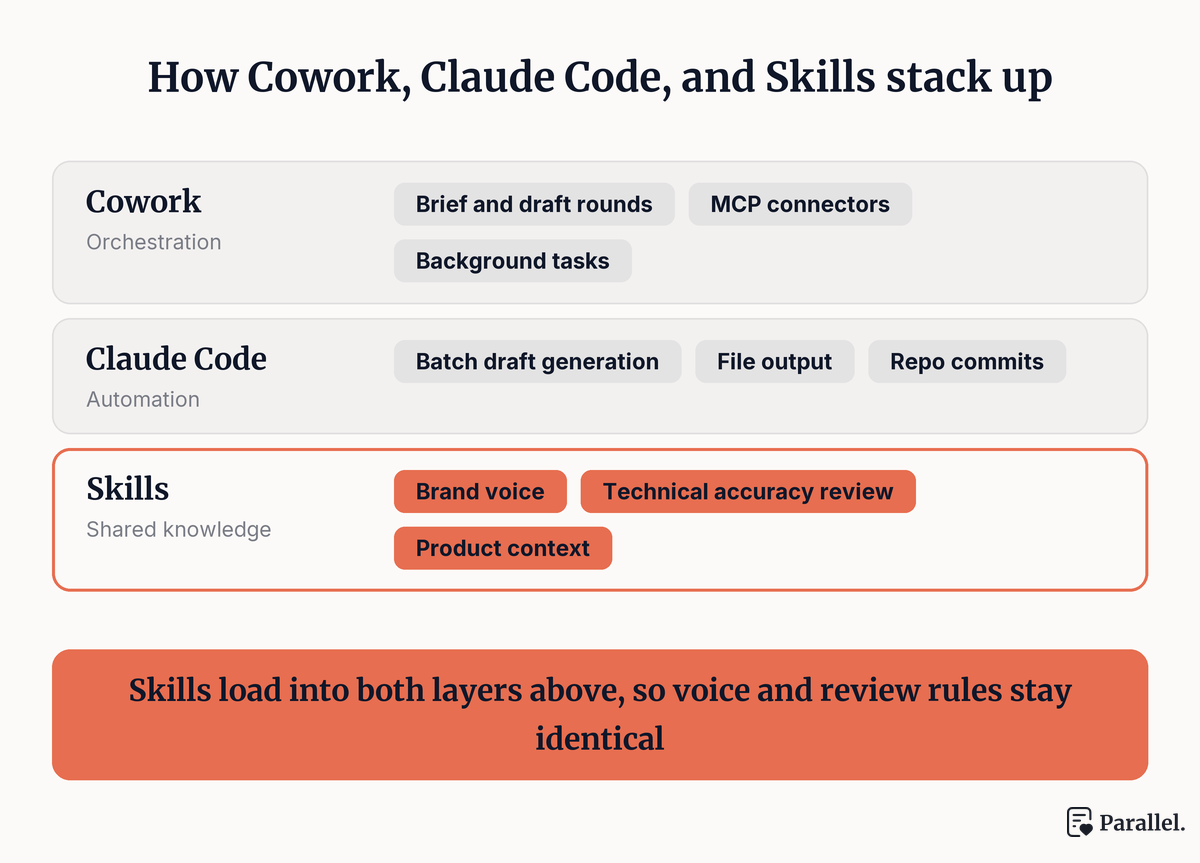
Figure 1: The three Claude surfaces and where each one sits in a content workflow.
In Claude Code, skills live at ~/.claude/skills/ (personal, available across all projects) or .claude/skills/ (project-level). In Claude Cowork, you upload them through your account settings. The Agent Skills spec is published as an open standard, so skills you author today can work across any platform that adopts it.
What Building a Workflow Takes
To produce a technically accurate, publish-ready blog post using Claude, here's what a reasonable in-house workflow would require:
- A product knowledge layer. Claude's training data doesn't know your API, your current pricing, or the method you deprecated last quarter. Someone has to feed it that context. This usually means writing a skill (or a set of skills) that loads your documentation into each drafting session, or prompting Cowork to read your docs folder before generating anything.
- A brief generation system. Deciding what to write, in what format, at what depth, and with which SEO angle requires either a dedicated prompt workflow or a skill that codifies the decision logic. This is doable, but it takes time to design well.
- An accuracy review step. Even with product documentation loaded, Claude can make confident-sounding mistakes on specifics. A review skill can help catch structural issues, but someone technical still needs to read the output before it publishes.
- SEO metadata handling. Claude doesn't automatically produce title tags, meta descriptions, URL slugs, and FAQ sections. You'd write a separate skill or prompt to generate those, then integrate the output with your CMS.
- A publishing integration. Getting a finished draft into GitHub with correct YAML frontmatter, or into a Webflow CMS collection, requires another automation layer: either a custom script, a Cowork workflow connecting to your repo, or a Claude Code routine.
- Ongoing maintenance. Every time your product changes, your skills need updating. When Claude releases a new model that changes behavior, you may need to revise your prompts. The infrastructure is yours to maintain.
None of this is impossible. Teams with strong engineering capacity can build it. But it's a non-trivial project, and it starts drifting from content work toward internal tooling work fairly quickly.
Where Parallel Content Handles the Difficult Parts
Parallel Content is built specifically for developer tool companies publishing technical blog content at a regular cadence. The workflow is designed to handle the pieces that are most painful to build yourself.
Product Context Is Indexed, Not Prompted
The most important difference is how product knowledge works. Parallel indexes your documentation site, product pages, changelog, and any files you provide. That context is baked into every draft. You don't write a skill to load your API reference. You don't re-explain your product when you start a new post. If your docs say the authentication header is X-API-Key, the draft will say that too.
With a DIY Claude workflow, loading product context requires either a carefully maintained skill that you update with each release, a Cowork session that reads your docs folder before every draft, or a prompt that you manually maintain. Any of these can work, but all of them require upkeep.
The Brief Is Structured, Not Prompted
Opening a chat window and prompting Claude well takes skill. What format should this post use? How long should it be? What's the right SEO angle for this keyword? What internal links are relevant? These aren't hard questions individually, but asking them consistently across a content program requires process.
Parallel gives you a structured brief interface. You specify the topic, format, depth, and keyword. The platform infers structure from there and produces a draft with consistent voice, formatting, and editorial approach. The result is predictable across posts, which matters at scale.
SEO Metadata Is Included, Not a Separate Step
Every Parallel draft ships with title options, a URL slug, a meta description, and FAQ items. External links point to the sources that informed the draft. Internal links connect to your existing docs and published posts. This is part of standard output, not an add-on step.
A DIY Claude workflow can produce SEO metadata with the right skill or prompt, but stitching it into the draft, validating that the internal links are correct, and integrating it all with your CMS is another layer of plumbing to build and maintain.
Expert Review Is Available Without Sourcing
For posts where technical accuracy is critical, Parallel's Expert Review option routes your draft to a vetted technical writer who validates claims, checks code examples, and proofreads against your brand guidelines. You don't brief them. They already have your context.
With a Claude-based workflow, the accuracy review is on you or on a technical team member. A Claude Code skill can run structural checks, but it can't catch a code example that compiles but produces wrong output, or a claim that was accurate six months ago but isn't anymore.
Publishing Integrations Don't Need Engineering
Parallel publishes directly to GitHub with YAML frontmatter for Astro, Hugo, Jekyll, and Next.js MDX projects, syncs to Webflow CMS collections, or exports as Markdown or Word. The draft goes from review to your publishing queue without any scripting.
A Claude Cowork workflow connected to GitHub via MCP can do something similar, but setting it up, testing it, and keeping it working is work that doesn't directly produce content.
Parallel Content vs. DIY AI Writing Workflow: Side-by-Side Comparison
| DIY Claude Workflow | Parallel Content | |
|---|---|---|
| Product knowledge | Manual: maintained via skills or prompt context | Automatic: indexed from your docs once |
| Setup time | Significant: skills, prompts, review flows, integrations | Minimal: index your docs, start generating |
| Brief creation | Ad hoc prompt or custom skill | Structured UI with consistent output |
| SEO metadata | Separate step, requires skill or prompt | Auto-generated with every draft |
| Internal linking | Manual or custom script | Automated |
| Technical accuracy review | DIY or delegate to engineering | Optional Expert Review add-on |
| Publishing integrations | Custom Cowork/Code workflows | GitHub, Webflow, Markdown, Word |
| Ongoing maintenance | You maintain the tooling | Maintained by Parallel |
| Cost | Claude Pro from $17/mo, but engineering time is real | From $199/month for 10 articles |
| Best for | Teams with engineering bandwidth and low volume | Teams publishing consistently at scale |
The Real Cost Is Time, Not Subscription Fees
The subscription comparison is the easy part. Claude Pro runs $17/month billed annually. A Parallel Content plan starts at $199/month for ten articles.
But that math ignores the actual cost of the DIY path. Building the skill library, writing the prompts, setting up the Cowork workflows, integrating with your CMS, and doing the review work yourself adds up to engineering hours that aren't shipping features. And the maintenance is ongoing. Every product update is a potential reason to revisit your skills. Every new Claude model release is a potential reason to test and revise your prompts.
For a fuller picture of what technical content writing costs across freelancers, agencies, and platforms, that breakdown is worth reading before you finalize any budget.
The teams that find the DIY path genuinely cost-effective are the ones where the workflow already exists for other reasons, where an engineer is already authoring Claude Code skills daily, and where the content volume is low enough that the overhead doesn't compound. For everyone else, the question isn't whether Claude is capable. It clearly is. The question is whether building and maintaining the infrastructure is the best use of your team's time.
Which Path Is Right for Your Team?
Build your own Claude workflow if:
- You're publishing fewer than two posts per month
- Your team already lives in Claude Code and has a skill-authoring practice
- Your content needs don't fit a standard blog post format
- You have an engineer willing to own the tooling and its maintenance
Use Parallel Content if:
- You're publishing consistently, four or more posts per month
- Your product is evolving quickly and your content needs to stay accurate
- Your engineering team's time is better spent on product
- You want a single place to manage your content pipeline from brief to publish
- You need technical accuracy guarantees without sourcing your own reviewers
The distinction isn't about Claude's capabilities. Claude Cowork and Claude Code are excellent tools for teams that want to build their own infrastructure. Skills make that infrastructure genuinely reusable and composable. But building, maintaining, and scaling that infrastructure is its own project.
Parallel Content is that project, already built. If you want to stop maintaining the pipeline and start getting the output, try it for free and generate your first grounded draft in minutes. And if you're still exploring which AI writing tool fits your stack, our roundup of the best AI writing tools for technical blogs covers the broader landscape.